- ~을 위한
- 이중 for 문
- 선택하다
- ~하는 동안
- 하는 동안
- 부서지다
- 계속해
1) 대한
for 루프는 초기값, 조건식, 증가식, 실행문으로 구성됩니다.
    for( let 초기값 ; 조건식 ; 증감식 ) {
        실행문
    }
초기값 변수는 i, j, k 순서로 지정해야 하며 조건식은 true/false로 평가됩니다.
    <script>
        'use strict';
        for (let i = 0; i < 5; i++) {
            document.write('HELLO :', i ,'<br>');
        }
    </script>

i가 0이므로 문서가 인쇄되고 i++이므로 1이 되어 for 문으로 돌아갑니다.
1 < 5가 true이므로 문서를 다시 인쇄하고 for 문을 다시 입력하려면 2가 됩니다.
이 연산은 i < 5가 false가 될 때까지 반복됩니다.
        for (let i = 0; i<=30 ; i+=2) {
            if (i % 2 === 0) {
                document.write(i, '<br>');
            }
        }
이와 같이 if와 %를 사용하여 짝수만 출력할 수 있습니다.
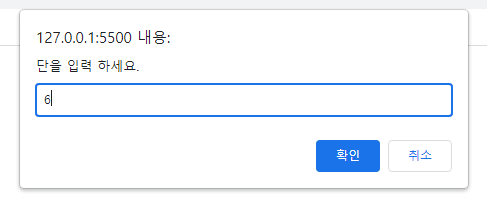
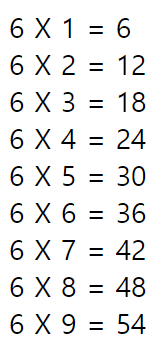
    <script>
        'use strict';
        let dan, result;
        dan = Number(prompt('단을 입력 하세요.'));
        for(let i = 1; i<=9; i++) {
            result = i * dan;
            document.write(dan,' X ',i,' = ',result,'<br>');
        }
    </script>
2) 더블 for 문
for 문을 for 문으로 감싸야 할 때 사용합니다.
    <script>
        'use strict';
        for(let i = 0; i <= 3; i++) {
            for(let j = 0; j <= 3; j++){
                document.write('i: '+i+' / '+'j: '+j+'<br>');
            }
            document.write('<br>')
        }
    </script>

첫 번째 for문의 i가 0이면 두 번째 for문으로 들어가고 j가 조건(j<=3)을 만족할 때까지 i는 0으로 유지되고 j의 값만 변경되어 출력된다.
그 후 i는 처음 for 문으로 돌아가서 1이 되고 i <= 3이 만족되지 않을 때까지 반복합니다.
        'use strict';
        for (let i = 0; i <5; i++) {
            for (let j = 0; j<=i; j++) {
                document.write('☆');
            }
            document.write('<br>');
        }
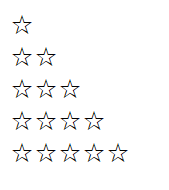
이렇게 하면 첫 번째 변수 i가 두 번째 for 문의 조건식에 포함될 수 있습니다.
3) 선택
mdn 선택 예
<select name="pets" id="pet-select">
    <option value="">--Please choose an option--</option>
    <option value="dog">Dog</option>
    <option value="cat">Cat</option>
    <option value="hamster">Hamster</option>
    <option value="parrot">Parrot</option>
    <option value="spider">Spider</option>
    <option value="goldfish">Goldfish</option>
</select>
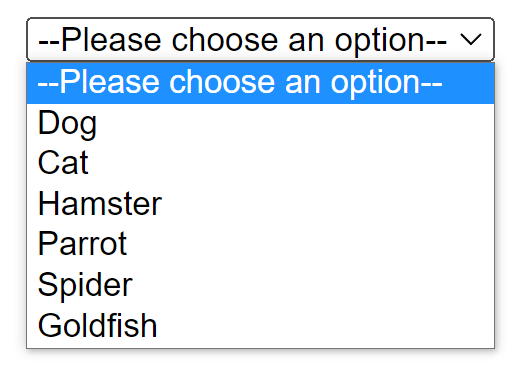
select는 옵션 메뉴를 제공하는 태그입니다.
    <script>
        'use strict';

        let month, day, year;

        year="<select>";
            year += '<option> ===연=== </option>';
            for( let i = 2023; i>=1900; i--) {
                year += '<option> '+i+'년 </option>';
            }
            year +='</select>';
        document.write(year);

        month="<select>";
            month = month + '<option> ===월=== </option>';
            for( let i=1; i<=12; i++) {
            month += '<option> '+i+'월 </option>';
        }
            month += '</select>';
        document.write(month);

        day = '<select>';
            day += '<option> ===일=== </option>';
            for( let i=1; i<=31; i++) {
            day += '<option> '+i+'일 </option>';
        }
            day +='</select>';
        document.write(day);

    </script>


select 문과 for 문을 함께 사용하여 위와 같은 예제를 만들 수 있습니다.
4) 동안
무한 적대가 필요할 때 주로 사용된다는 것을 배웠습니다.
    <script>
        'use strict';
        let x = 0; //초기값
        while(x<10) { //조건식
            document.write(x, '<br>'); //실행문
            x++; //증감식
        }
    </script>
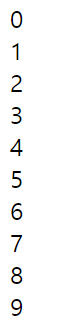
위의 예에서 조건식이 1 또는 true로 변경되면 무한 반복됩니다.
5) 할 동안
조건식의 결과가 거짓이더라도 처음 실행됩니다.
        let x = -10;
        do{
            document.write(x,'<br>');
            x++;
        } while (x>10)

첫 번째 x 값은 -10으로 조건식 x>10을 만족하지 못하지만 -10이 반환됩니다.
6) 휴식
    <script>
        'use strict';
        //break 중단 : 보통 무한 반복할 때 사용
        let x = 0;
        while(true) { //무한반복
            if(x>10) {
                break;
            }
            document.write(x, '<br>');
            x++;
        }
    </script>

while의 조건식을 true로 설정하면 무한 반복해야 하지만 if 문에서 x>10이 true이면 break를 수행하고 while문을 종료하고 다음 줄로 이동한다.
7) 추가
        for (let i = 0; i<=10; i++) {
            if (i === 5) {
                continue; // i===5가 true이므로 다시 처음 for문으로
            }
            document.write(i,'<br>');
        }
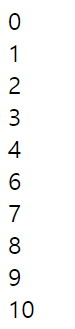
i의 값이 5, Continue이면 if문의 참 실행문이 실행되고 문서를 반복하지 않고 다시 for문으로 이동하며 5만 출력되지 않는다.